启用k8s-device-plugin
在多卡分布式集群中,我们需要多这个加
安装前置条件
shell
nvidia-ctk runtime configure --runtime=containerd --set-as-default错误处理
Failed to allocate device vector A (error code system not yet initialized)!
在有些多卡集群环境下需要安装
nv-fabricmanager,例如H100,H800,A100,A800,在运行验证pod时出现这个错误时,需要安装。Failed to allocate device vector A (error code system not yet initialized)!
shell# 这里写nvidia driver的版本 version=550.54.14 main_version=$(echo $version | awk -F '.' '{print $1}') sudo apt-get update sudo apt-get -y install nvidia-fabricmanager-${main_version}=${version}-* systemctl enable nvidia-fabricmanager systemctl start nvidia-fabricmanager.service systemctl status nvidia-fabricmanager.service
could not load NVML library: libnvidia-ml.so.1: cannot open shared object file: No such file or directory
有时候设置nvidia作为默认的运行时后,还会出现一下错误,就需要应用这个yaml,并且修改deamonSet的runtimeClass
I0524 08:28:03.908084       1 factory.go:107] Detected non-NVML platform: could not load NVML library: libnvidia-ml.so.1: cannot open shared object file: No such file or directory
I0524 08:28:03.908113       1 factory.go:107] Detected non-Tegra platform: /sys/devices/soc0/family file not found
yaml
---
apiVersion: v1
items:
- apiVersion: node.k8s.io/v1
  handler: nvidia
  kind: RuntimeClass
  metadata:
    name: nvidia
---
apiVersion: apps/v1
kind: DaemonSet
metadata:
  name: nvidia-device-plugin-daemonset
  namespace: kube-system
spec:
  selector:
    matchLabels:
      name: nvidia-device-plugin-ds
  updateStrategy:
    type: RollingUpdate
  template:
    metadata:
      labels:
        name: nvidia-device-plugin-ds
    spec:
      runtimeClassName: nvidia
      tolerations:
      - key: nvidia.com/gpu
        operator: Exists
        effect: NoSchedule
      priorityClassName: "system-node-critical"
      containers:
      - image: nvcr.io/nvidia/k8s-device-plugin:v0.14.1
        name: nvidia-device-plugin-ctr
        env:
          - name: FAIL_ON_INIT_ERROR
            value: "false"
        securityContext:
          allowPrivilegeEscalation: false
          capabilities:
            drop: ["ALL"]
        volumeMounts:
        - name: device-plugin
          mountPath: /var/lib/kubelet/device-plugins
      volumes:
      - name: device-plugin
        hostPath:
          path: /var/lib/kubelet/device-plugins
---
apiVersion: v1
kind: Pod
metadata:
  name: cuda-vectoradd
spec:
  restartPolicy: OnFailure
  runtimeClassName: nvidia
#  nodeSelector:
#    kubernetes.io/hostname: node10
  containers:
  - name: cuda-vectoradd
    image: "nvcr.io/nvidia/k8s/cuda-sample:vectoradd-cuda10.2"
    resources:
      limits:
         nvidia.com/gpu: 1
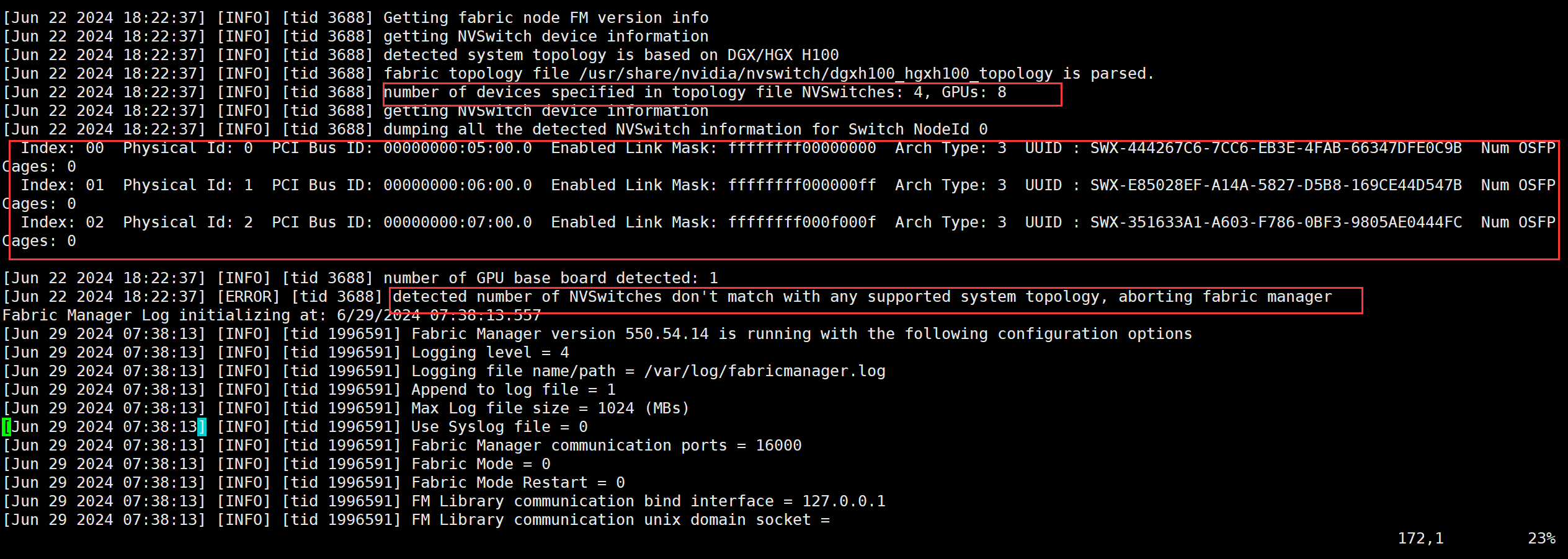
detected number of NVSwitches don't match with any supported system topology, aborting fabric manager
出现这个错误时,应为nvswitch的数量不正确,可以在
/var/log/fabricmanager.log中查看
可以看到上图中应该有4个NVSwitch,但是值ENable Link了三个,所以导致了出错
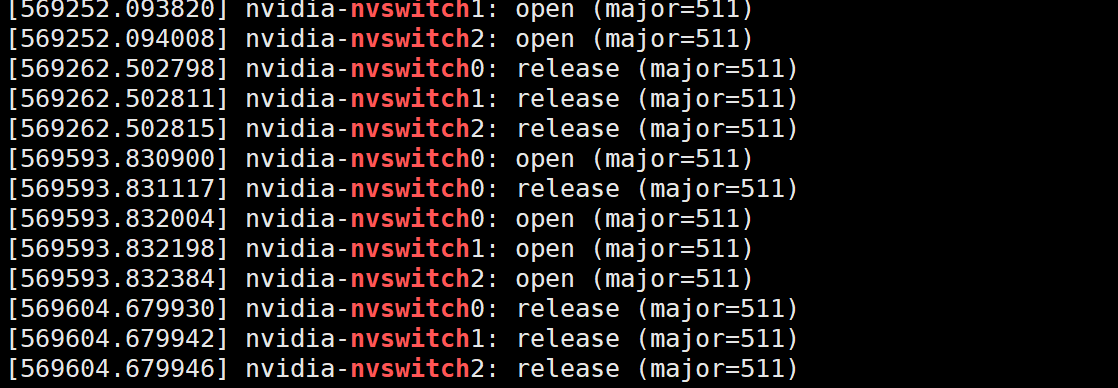
再通过
dmesg | grep -i nvswitch,只能看到0,1,2,
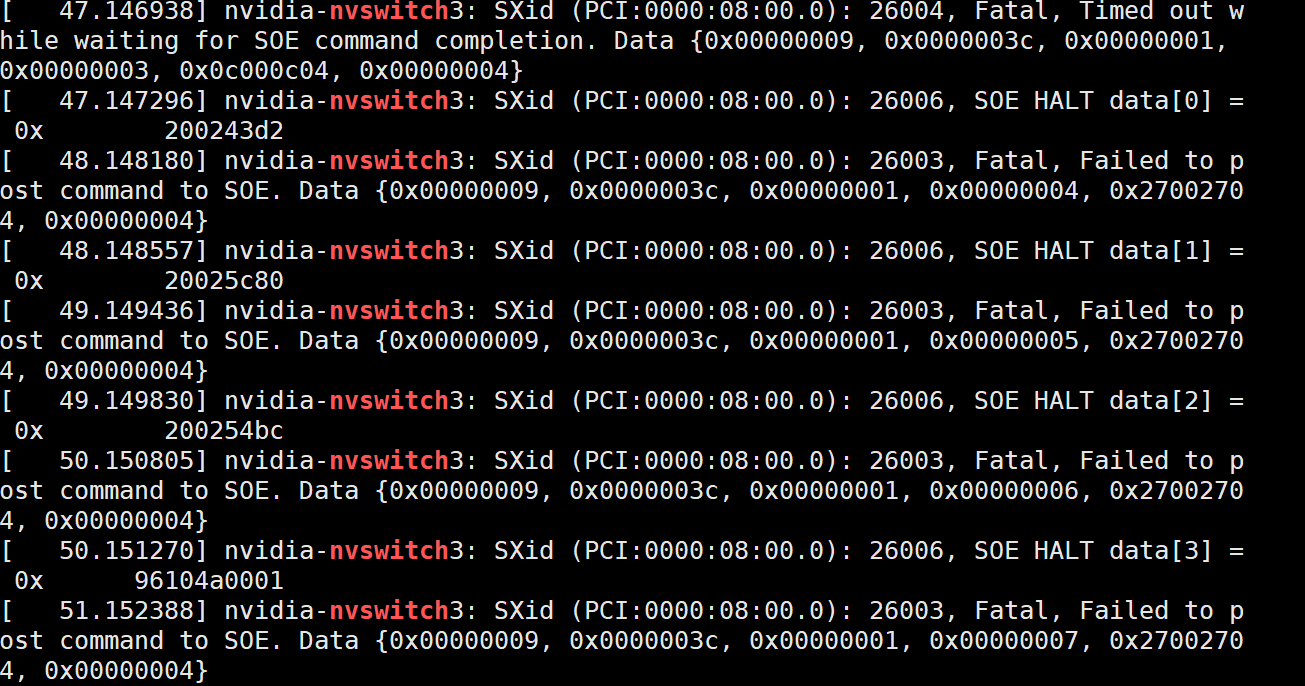
再通过这个找3相关的日志
是有问题的,所以是硬件问题,我通过重启系统解决了问题