交换机配置
交换机特点
- 连接多个以太网物理段,隔离冲突域
- 对以太网帧进行高速而透明的交换转发
- 自行学习和维护MAC地址信息
交换机特点
- 主要工作在OSI模型的物理层、数据链路层
- 提供以太网间的透明桥接和交换
- 依据链路层的MAC地址,将以太网数据帧在端口间进行转发
交换机的工作原理
网络拓扑图如下,一个交换机连接三个设备
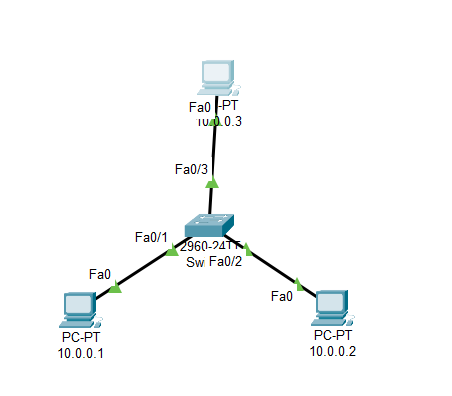
在开始的时候,交换机中的
Mac地址表是没有任何地址的
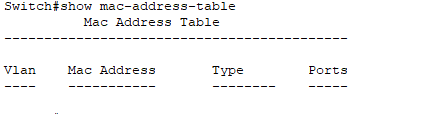
这是在我没有配置IP的情况下,他们不会向外发送网络数据包,当我配置地址后,他们会发送一些数据报文,所以会学习到Mac地址
在刚开始的时候,交换机不知道任何接口的
Mac地址,下面是学习的步骤
- 假设上图的
10.0.0.1发出数据帧,交换机将PC0的Mac地址和f0/1关联Mac地址表中出现一条对应记录,而交换机只知道这条记录,所以,交换机进行泛洪,当目标主机收到数据包,在回复数据帧,交换又建立了一条对应的记录,就这样,交换机学习完成.- 交换机学习完成后,就可以进行单播转发了
泛洪:当交换机的Mac地址表中没有对应的Mac记录时,交换机就会将该数据帧,发送到除发送接口的所有接口(注意这里的数据帧的目的Mac没有发生改变,和广播不同的是,广播的目的Mac地址为全F)
交换机操作
切换工作模式
工作模式:
- 用户模式
- 特权模式
- 全局配置模式
- 接口模式
用户模式:(默认在此模式下)
swiftSwitch>特权模式:
swiftSwitch>enable Switch#全局配置模式:
swiftSwitch#configure terminal Enter configuration commands, one per line. End with CNTL/Z. Switch(config)#接口配置模式
Switch(config)#interface  接口类型 接口号
Switch(config-if)#
返回上一级
exit返回特权模式
end
基本设置
修改主机名
Switch(config)#hostname fsl
fsl(config)#
设置明文口令(在用户模式切换到特权模式时会用到)
Switch(config)#enable password 123配置密文口令
密文口令会覆盖明文口令,若密文存在,设置的明文不会生效
Switch(config)#enable secret 123保存交换机配置
Switch#copy running-config startup-config
Destination filename [startup-config]?
Building configuration...
[OK]
恢复出厂配置
Switch#erase startup-config
Erasing the nvram filesystem will remove all configuration files! Continue? [confirm]
[OK]
Switch#reload
禁用端口
Switch(config)#enable
Switch(config)#interface fastEthernet 0/1
Switch(config-if)#no shutdown
禁用DNS查询(解决命令输错,被当成域名解析的卡死情况
switch(config)#no ip domain-lookup光标跟随(防止输入命令过程中弹出信息打断命令)
(config)# line console 0
(config-line)# logging synchronous
指定接口的双工模式
switch(config-if)# duplex {full | half | auto} #duplex,双重指定接口的通信速率
switch# show interface fastethernet 0/24交换机设置网关:实现不同网段设备可对该交换机远程管理
全局模式:ip default-gateway 网关ip地址

查看信息
查看Mac地址表
Switch#show mac-address-table查看配置信息(当前运行的配置)
Switch# show running-config //查看交换机配置信息查看IOS版本
Switch# show version //查看IOS版本信息查看以太网接口的双工模式和通信速率
switch# show interface fastethernet 0/24
Vlan操作
创建
Vlan(config)# vlan 编号 //编号1-1005 (config-vlan)# Name 名字 //给vlan命名将接口接入
Vlan1) 单个接口接入
vlan(config)# interface 接口名 //进入要加入vlan的接口 (config-if)# switchport access vlan 编号 //交换机接口接入vlan2) 多个接口接入
vlan(config)# interface range f0/1–10 //进入连续的接口 (config)# interface range fastEthernet0/1,fa0/3, ... //进入不连续的接口 (config-if-range)# switchport access vlan 编号 //多接口加入查看
vlan# show vlan 或者在其他模式下,使用 (config)# do show vlan删除
vlan(config)# no vlan 编号将接口设置为
trunk口 (config)# 进入接口模式 (config-if)# switchport mode trunk ( 配置为trunk中继链路) #交换机端口 模式 trunk (config-if)# switchport mode access ( 配置为access接入链路)在trunk链路上 添加vlan (允许vlan在trunk传递数据)
(config)# interface  trunk的接口                                //进入trunk链路接口
(config-if)# switchpot  trunk allowd vlan add  vlan编号         //允许vlan
在trunk链路上 移除vlan (不允许vlan在trunk传递数据)
(config)# interface fastEthernet trunk的端口名                  #进入trunk所在端口
(config-if)# switchport trunk allowed vlan remove  vlan编号
允许所有
vlan通过trunk口 (config-if)# switchpot trunk allowd vlan all //允许vlan查看接口模式
# show  interface  接口名  switchport
# show interfaces fastEthernet 0/24 switchport
Vtp(Vlan trunk protocol)操作
vtp的作用
同步各个交换机之间的
vlan信息,以便快速的添加vlan,实现快速配置,vtp有三种模式
服务器模式(server):一般,一个VTP域内的整个网络只设一个VTP Server。VTP Server交换机维护该VTP域中所有VLAN 信息列表.VTP Server可以建立、删除或修改VLAN。
客户端模式(client):虽然也维护所有VLAN信息列表,但其VLAN的配置信息是从VTP Server学到的,VTP Client不能建立、删除或修改VLAN。vtp client的交换机会自动学习vtp server上的vlan信息.
透明模式(transparent):不从VTP Server学习VLAN的配置信息 本设备自己维护的VLAN信息 VTPTransparent可以建立、删除和修改本机上的 VLAN信息。可以转发vtp信息
配置
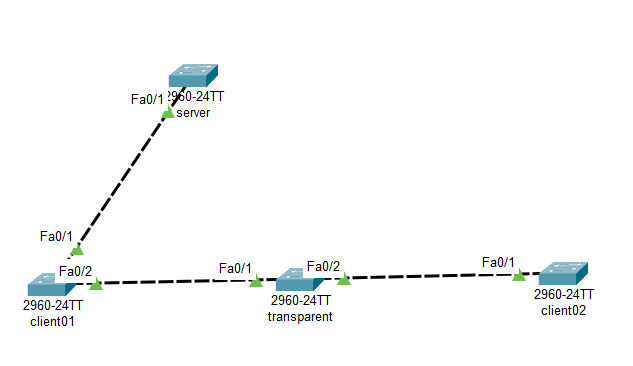
server端 shellSwitch#conf t Switch(config)#hostname server server(config)#interface fastEthernet 0/1 //将与其他交换机相连的接口配置为trunk server(config-if)#switchport mode trunk server(config-if)#switchport trunk allowed vlan all server(config-if)#exit server(config)#vtp mode server //设置模式为server Device mode already VTP SERVER. server(config)#vtp domain fsl //设置域名为fsl Changing VTP domain name from NULL to fsl server(config)#vtp password 123 //设置密码为123 Setting device VLAN database password to 123 server(config)#vtp version 2 //默认为2,最好设置一下配置client01端
shellSwitch#conf t Enter configuration commands, one per line. End with CNTL/Z. Switch(config)#hostname client01 client01(config)#interface range fastEthernet 0/1-2 //将两个端口设置为trunk client01(config-if-range)#switchport mode trunk client01(config-if-range)#switchport trunk allowed vlan all client01(config-if-range)#ex client01(config)#vtp mode client Setting device to VTP CLIENT mode. client01(config)#vtp domain fsl //这里的域名和密码要和server端一致 Domain name already set to fsl. client01(config)#vtp password 123 Setting device VLAN database password to 123配置transparent
shellSwitch>en Switch#conf t Enter configuration commands, one per line. End with CNTL/Z. Switch(config)#hostname transparent transparent(config)#inter range f0/1-2 transparent(config-if-range)#switchport mode trunk transparent(config-if-range)#switchport trunk allowed vlan all transparent(config-if-range)#exit transparent(config)#vtp mode transparent Setting device to VTP TRANSPARENT mode. transparent(config)#vtp domain fsl Changing VTP domain name from NULL to fsl transparent(config)#vtp password 123 Setting device VLAN database password to 123配置client02
shellSwitch>en Switch#conf t Enter configuration commands, one per line. End with CNTL/Z. Switch(config)#interface fastEthernet 0/1 Switch(config-if)#switchport mode trunk Switch(config-if)#switchport trunk allowed vlan all Switch(config-if)#ex Switch(config)#hostname client02 client02(config)#vtp mode client Setting device to VTP CLIENT mode. client02(config)#vtp domain fsl Domain name already set to fsl. client02(config)#vtp password 123 Setting device VLAN database password to 123现象
在
server端创建vlan后,会自动同步带两个client,transparent并不会被同步client01
client01#show vlan

VLAN Name                             Status    Ports
---- -------------------------------- --------- -------------------------------
1    default                          active    Fa0/3, Fa0/4, Fa0/5, Fa0/6
                                                Fa0/7, Fa0/8, Fa0/9, Fa0/10
                                                Fa0/11, Fa0/12, Fa0/13, Fa0/14
                                                Fa0/15, Fa0/16, Fa0/17, Fa0/18
                                                Fa0/19, Fa0/20, Fa0/21, Fa0/22
                                                Fa0/23, Fa0/24, Gig0/1, Gig0/2
10   VLAN0010                         active
20   VLAN0020                         active
30   VLAN0030                         active
1002 fddi-default                     active
1003 token-ring-default               active
1004 fddinet-default                  active
1005 trnet-default                    active
transparent
transparent#show vlan

VLAN Name                             Status    Ports
---- -------------------------------- --------- -------------------------------
1    default                          active    Fa0/3, Fa0/4, Fa0/5, Fa0/6
                                                Fa0/7, Fa0/8, Fa0/9, Fa0/10
                                                Fa0/11, Fa0/12, Fa0/13, Fa0/14
                                                Fa0/15, Fa0/16, Fa0/17, Fa0/18
                                                Fa0/19, Fa0/20, Fa0/21, Fa0/22
                                                Fa0/23, Fa0/24, Gig0/1, Gig0/2
1002 fddi-default                     active
1003 token-ring-default               active
1004 fddinet-default                  active
1005 trnet-default                    active
client02
client02#sh vl

VLAN Name                             Status    Ports
---- -------------------------------- --------- -------------------------------
1    default                          active    Fa0/2, Fa0/3, Fa0/4, Fa0/5
                                                Fa0/6, Fa0/7, Fa0/8, Fa0/9
                                                Fa0/10, Fa0/11, Fa0/12, Fa0/13
                                                Fa0/14, Fa0/15, Fa0/16, Fa0/17
                                                Fa0/18, Fa0/19, Fa0/20, Fa0/21
                                                Fa0/22, Fa0/23, Fa0/24, Gig0/1
                                                Gig0/2
10   VLAN0010                         active
20   VLAN0020                         active
30   VLAN0030                         active
1002 fddi-default                     active
1003 token-ring-default               active
1004 fddinet-default                  active
1005 trnet-default                    active