三层交换配置vlan间通信
拓扑图
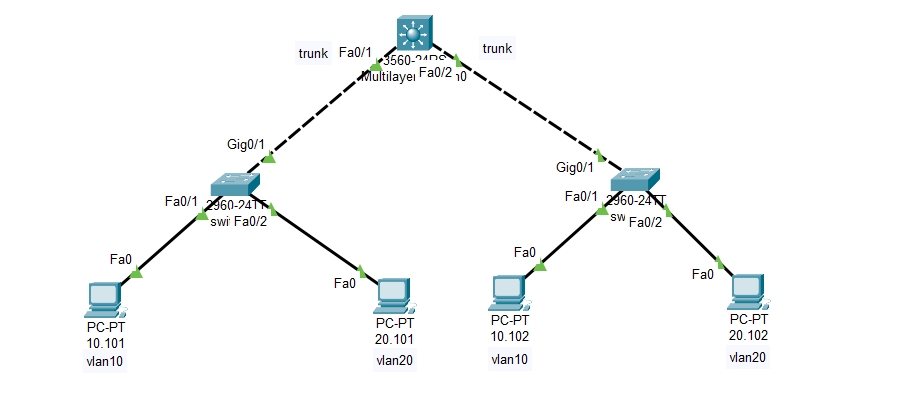
不借助路由器完成不同vlan之间的通信
交换机的配置就不写了,就是按照上图配置,没有什么不一样的
三层交换机配置
shell
创建vlan:(在配置ip之前一定要创建vlan,不然interface的vlan虚拟端口一直是down的,必须要创建)
Switch#configure terminal
Switch(config)#vlan 10
Switch(config-vlan)#vlan 20
Switch(config-vlan)#exit
创建vlan对应的IP网关地址:Switch(config)#interface vlan 10
Switch(config-if)#ip address 192.168.10.1 255.255.255.0
Switch(config-if)#exit
Switch(config)#interface vlan 20
Switch(config-if)#ip address 192.168.20.1 255.255.255.0
Switch(config-if)#exit
将连接二层交换机的端口配置为trunk模式:
Switch(config)#interface fastEthernet 0/1
Switch(config-if)#switchport trunk encapsulation dot1q
Switch(config-if)#switchport mode trunk
Switch(config-if)#no shutdown
Switch(config-if)#exit
Switch(config)#interface fastEthernet 0/2
Switch(config-if)#switchport trunk encapsulation dot1q
Switch(config-if)#switchport mode trunk
Switch(config-if)#no shutdown
Switch(config-if)#exit
开启路由功能:(一定要开去路由功能,不然无法转发数据包)
Switch(config)#ip routing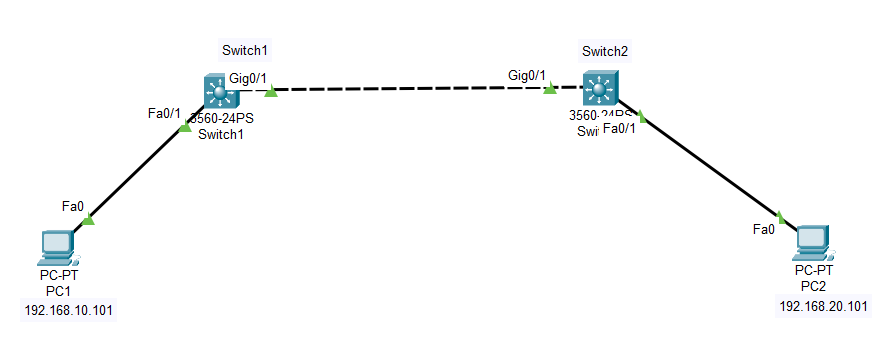
在上面的实验拓扑中,想要让两台
PC通信,需要在两个三层交换机上都配置网关,例如:在上图中:
- 左边只有
vlan10一个Vlan,想要与右边的vlan20通信,需要在Switch1上配置Vlan10和Vlan20,不能只配置vlan10不配置vlan20,同样的Switch2也是这样的,不然他们是无法通信的
Switch1:
Vlan10:192.168.10.1vlan2:192.168.20.1
Switch2:
Vlan10:192.168.10.1vlan2:192.168.20.1