官网
部署
下载yaml文件
bash
wget https://raw.githubusercontent.com/kubernetes/ingress-nginx/controller-v1.5.1/deploy/static/provider/cloud/deploy.yaml修改文件
shell
# vim搜索containerPor
在name为http和https的选项中加入hostPort,相当于劫持宿主机的80端口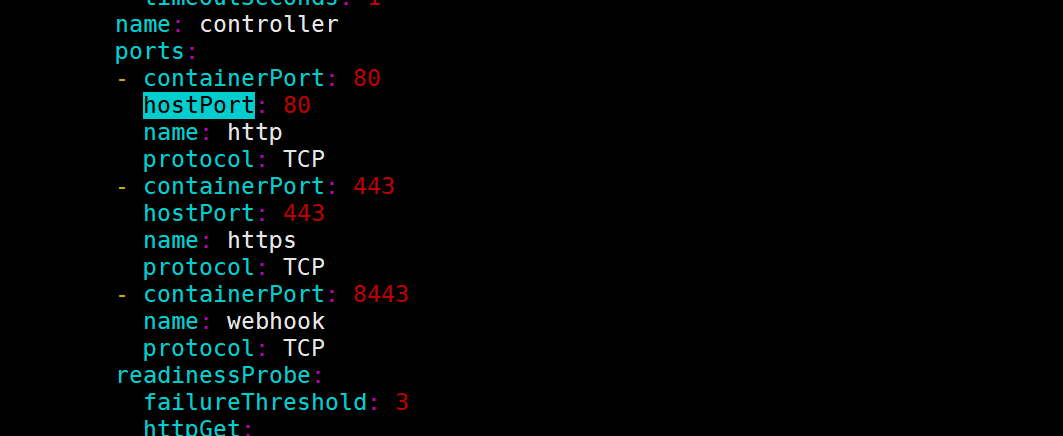
shell
# vim搜索nodeSelector
使用改配置选定一个node结点,让pod在上面不要转移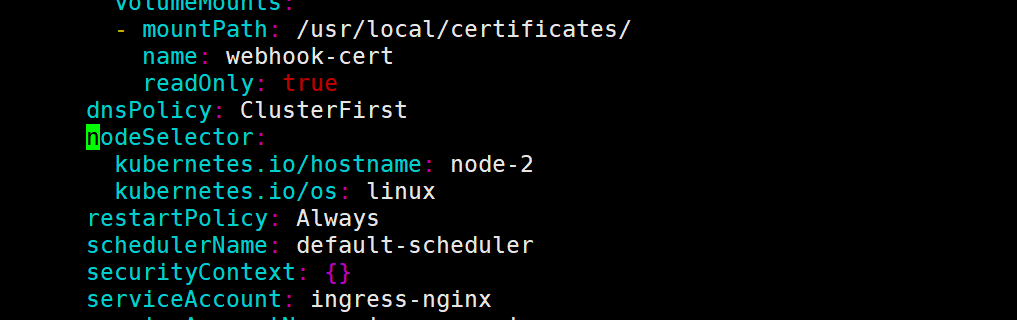
想办法搞到镜像
部署这个东西最难的就是拉取镜像
shell
root@master-1:~/yaml/nginx# kubectl get job,pods -n ingress-nginx
NAME                                       COMPLETIONS   DURATION   AGE
job.batch/ingress-nginx-admission-create   1/1           4s         99m
job.batch/ingress-nginx-admission-patch    1/1           5s         99m

NAME                                            READY   STATUS      RESTARTS   AGE
pod/ingress-nginx-admission-create--1-qwhs6     0/1     Completed   0          99m
pod/ingress-nginx-admission-patch--1-6hmtj      0/1     Completed   0          99m
pod/ingress-nginx-controller-5767d67768-4zgqj   1/1     Running     0          98m
root@master-1:~/yaml/nginx# kubectl get job,pods,secret -n ingress-nginx
NAME                                       COMPLETIONS   DURATION   AGE
job.batch/ingress-nginx-admission-create   1/1           4s         99m
job.batch/ingress-nginx-admission-patch    1/1           5s         99m

NAME                                            READY   STATUS      RESTARTS   AGE
pod/ingress-nginx-admission-create--1-qwhs6     0/1     Completed   0          99m
pod/ingress-nginx-admission-patch--1-6hmtj      0/1     Completed   0          99m
pod/ingress-nginx-controller-5767d67768-4zgqj   1/1     Running     0          98m

NAME                                         TYPE                                  DATA   AGE
secret/default-token-w6hwr                   kubernetes.io/service-account-token   3      123m
secret/ingress-nginx-admission               Opaque                                3      99m
secret/ingress-nginx-admission-token-6ppw6   kubernetes.io/service-account-token   3      123m
secret/ingress-nginx-token-xrzmr             kubernetes.io/service-account-token   3      123m
job必须完成,ingress-nginx-controller也必须部署完成,只要镜像拉取下来,按理来说,应该不会出现问题,如果无法创建,检查
secret/ingress-nginx-admission是否生成
ingress完成七层的转发,必须要将流量引导到ingress-nginx-controller中,不然无法进行转发动作,而将流量转发到ingress-nginx-controller中,有以下几种方法
创建NodePort类型的service,暴露端口
使用depoyment,在定义pod模板的时候使用hostPort,把pod端口映射到主机
定义pod模板时使用hostNetwork直接共享宿主机网络。
原来还有一种使用iptable规则,劫持所有80和443端口的流量,将其转发到ingress-nginx-controller中,但是现在没有看到实现方式呢(使用hostPort选项)
检查
deploy
yaml
apiVersion: apps/v1
kind: Deployment
metadata:
  labels:
    app.kubernetes.io/instance: nginx
    app.kubernetes.io/name: nginx
  name: nginx
  namespace: default
spec:
  replicas: 1
  revisionHistoryLimit: 10
  selector:
    matchLabels:
      app.kubernetes.io/instance: nginx
      app.kubernetes.io/name: nginx
  template:
    metadata:
      labels:
        app.kubernetes.io/instance: nginx
        app.kubernetes.io/name: nginx
    spec:
      containers:
      - env:
        - name: BITNAMI_DEBUG
          value: "false"
        - name: NGINX_HTTP_PORT_NUMBER
          value: "8080"
        image: docker.io/bitnami/nginx:1.23.3-debian-11-r8
        imagePullPolicy: IfNotPresent
        livenessProbe:
          failureThreshold: 6
          initialDelaySeconds: 30
          periodSeconds: 10
          successThreshold: 1
          tcpSocket:
            port: http
          timeoutSeconds: 5
        name: nginx
        ports:
        - containerPort: 8080
          name: http
          protocol: TCP
        readinessProbe:
          failureThreshold: 3
          initialDelaySeconds: 5
          periodSeconds: 5
          successThreshold: 1
          tcpSocket:
            port: http
          timeoutSeconds: 3
        resources: {}
        terminationMessagePath: /dev/termination-log
        terminationMessagePolicy: File
svc
yaml
apiVersion: v1
kind: Service
metadata:
  labels:
    app.kubernetes.io/instance: nginx
    app.kubernetes.io/name: nginx
    helm.sh/chart: nginx-13.2.21
  name: nginx
  namespace: default
spec:
  ports:
  - name: http
    port: 80
    protocol: TCP
    targetPort: http
  selector:
    app.kubernetes.io/instance: nginx
    app.kubernetes.io/name: nginx
  sessionAffinity: None
  type: ClusterIP
ingress
yaml
apiVersion: networking.k8s.io/v1
kind: Ingress
metadata:
  annotations:
  name: test-ingress
  namespace: default
spec:
  ingressClassName: nginx
  rules:
  - host: test.com
    http:
      paths:
      - backend:
          service:
            name: nginx
            port:
              number: 80
        path: /
        pathType: Prefix
如果上面在创建ingress时没有设置default-ingress,需要在这里指向哪个ingressclass处理这个ingress
测试
在局域网中,将test.com指向ingress-nginx-controller调度到的节点ip,然后对该域名进行访问
bash
root@manager:/etc/clash# curl test.com/
<!DOCTYPE html>
<html>
<head>
<title>Welcome to nginx!</title>
<style>
html { color-scheme: light dark; }
body { width: 35em; margin: 0 auto;
font-family: Tahoma, Verdana, Arial, sans-serif; }
</style>
</head>
<body>
<h1>Welcome to nginx!</h1>
<p>If you see this page, the nginx web server is successfully installed and
working. Further configuration is required.</p>

<p>For online documentation and support please refer to
<a href="http://nginx.org/">nginx.org</a>.<br/>
Commercial support is available at
<a href="http://nginx.com/">nginx.com</a>.</p>

<p><em>Thank you for using nginx.</em></p>
</body>
</html>
一些设置
设置默认ingressClass
yaml
apiVersion: networking.k8s.io/v1
kind: IngressClass
metadata:
  annotations:
	ingressclass.kubernetes.io/is-default-class: true
  labels:
    app.kubernetes.io/component: controller
    app.kubernetes.io/instance: ingress-nginx
    app.kubernetes.io/name: ingress-nginx
    app.kubernetes.io/part-of: ingress-nginx
    app.kubernetes.io/version: 1.4.0
  name: nginx
spec:
  controller: k8s.io/ingress-nginx
添加注解:
ingressclass.kubernetes.io/is-default-class: true